-
패키지 코틀린 버전 맞추기모바일 개발/Flutter 2025. 11. 16. 09:43반응형
플러터 프로젝트를 문제 없이 빌드하려면 각 패키지가 요구하는 최소 코틀린 버전을 맞춰주어야 한다.
패키지별 최소 요구 사항 정보(Requirements)는 pub.dev에서 패키지를 검색하여 확인할 수 있다.
예를 들어 share_plus 12.0.1 버전의 경우
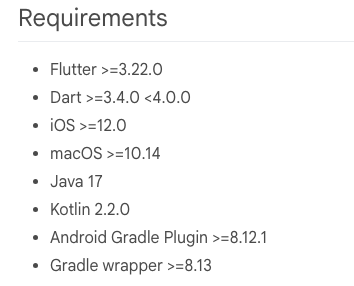
251116 기준 2.2.0 버전의 코틀린을 사용할 것을 요구하고 있다.
내 프로젝트의 코틀린 버전은
{플러터_프로젝트_루트}/android/settings.gradle.kts 파일의 아래 부분에서 확인할 수 있다.
plugins {
    id("dev.flutter.flutter-plugin-loader") version "1.0.0"
    id("com.android.application") version "8.7.0" apply false
    id("org.jetbrains.kotlin.android") version "1.8.22" apply false
}
위처럼 코틀린 버전이 낮을 경우 org.jetbrains.kotlin.android의 버전 값을 "2.2.0"으로 수정 후 다시 빌드한다.
* 버전이 낮을 경우 다음과 같은 에러 메세지가 발생한다.
FAILURE: Build failed with an exception.
* What went wrong:
Execution failed for task ':share_plus:compileDebugKotlin'.
> A failure occurred while executing org.jetbrains.kotlin.compilerRunner.GradleCompilerRunnerWithWorkers$GradleKotlinCompilerWorkAction
> Compilation error. See log for more details
* Try:
> Run with --stacktrace option to get the stack trace.
> Run with --info or --debug option to get more log output.
> Run with --scan to get full insights.
> Get more help at https://help.gradle.org.
BUILD FAILED in 20s
Flutter Fix
[!] Your project requires a newer version of the Kotlin Gradle plugin.
Find the latest version on https://kotlinlang.org/docs/releases.html#release-details, then
update the
version number of the plugin with id "org.jetbrains.kotlin.android" in the plugins block of
/Users/....../android/settings.gradle.
Alternatively (if your project was created before Flutter 3.19), update
/Users/....../android/build.gradle
ext.kotlin_version = '<latest-version>'
Error: Gradle task assembleDebug failed with exit code 1반응형'모바일 개발 > Flutter' 카테고리의 다른 글
앱 아이콘 세팅 (0) 2025.11.21 다국어 지원(Localization) (0) 2025.11.16 플러터 apk, ipa 파일 생성 (1) 2025.08.06 inappwebview로 html 파일 열기 (1) 2025.08.06 flutter create (2) 2025.08.06